What Fylm.ai is, and why photographers use it
Fylm.ai is a browser-based colour grading platform built on ACEScct colour science. It allows creators to grade stills and motion footage without installing heavy desktop suites, combining colour-management wheels with AI tools like AI Colour Extract and its NeuralFilmAI engine.
While widely used by cinematographers, Fylm.ai attracts photographers because it bridges the gap between cinematic grading and stills editing. Photographers can import RAW or TIFF files, develop a bespoke film grade, and export the result as standard 3D LUTs (.cube), enhanced XMP camera profiles for Adobe Lightroom Classic and Camera Raw, or ICC profiles for Capture One Pro. This allows you to design a look once and apply it non-destructively across an entire catalog.
Storage handling depends on the plan you choose. Fylm.ai's entry tier processes and stores assets locally on your own machine without mandatory cloud uploads, whereas its upper tiers use cloud storage to enable multi-user reviews and client sharing.
According to Fylm.ai's official pricing (verified November 2026), the platform offers four subscription tiers (billed annually):
- Free ($0): Single user, 3 cloud projects, standard 8-bit web grading tools, and community support.
- Lite ($7/month billed annually / $84/year): Single user with unlimited local storage and unlimited LUT creation. Includes NeuralFilmAI, AI Auto Correct, AI Colour Extract, and AI Colour Match.
- Pro ($15/month billed annually / $180/year): Starts at 1 user (collaborators up to 5 users cost $15/user/month). Includes everything in Lite plus the Premiere Pro extension, NeuralToneAI, 10 GB cloud storage, client sharing, and client download permissions.
- Team ($30/month billed annually / $360/year): Starts with 3 included users (collaborators up to 10 users cost $15/user/month). Includes everything in Pro plus 25 GB cloud storage, team-only comments, client-assignable statuses, and priority support.
Why look for a Fylm.ai alternative
While Fylm.ai provides an intuitive interface, photographers frequently seek alternatives due to three key workflow factors:
1. Browser workflows vs. in-editor plugins. Even though Fylm.ai Lite uses local storage, you still work inside a web browser rather than directly inside your primary editing application. Many portrait, commercial, and wedding photographers prefer desktop plugins that operate directly within Lightroom Classic, Photoshop, or Capture One without switching environments.
2. Video-first design and unnecessary overhead. Fylm.ai, ACES pipelines, and similar cinematic suites are engineered with video productions in mind. If you strictly shoot still photography, much of the motion color science and timeline management adds operational complexity you may never use.
3. Ongoing subscription fees vs. perpetual ownership. Fylm.ai requires an annual subscription commitment. Creators who prefer buying software once and owning it permanently often turn to standalone profile generators like 3D LUT Creator or Dehancer's lifetime options.
Here is what to consider instead, and who each tool suits.
The alternatives
| Tool | Best for | Type / Host | OS Support | Pricing |
|---|---|---|---|---|
| Dehancer Photo | Authentic film stock emulation inside your editor | Plugin (Lightroom Classic, Photoshop, Capture One, Affinity) | macOS & Windows | $156/yr billed annually ($13/mo equiv); $35/mo monthly; or $549 lifetime |
| Colourlab Ai 4 | AI shot matching & timeline grading for hybrid shooters | Standalone app (DaVinci Resolve, Premiere Pro, Final Cut Pro) | macOS 14+ (Apple silicon M-series only) | $49/mo, $399/yr, or $799 perpetual |
| 3D LUT Creator | Precision grid color grading & 3D LUT export | Standalone app + Photoshop plugin | macOS & Windows | $99–$249 perpetual license |
| Pixieset Photo Editor | AI batch editing & custom styles (ex-Polarr Next) | Desktop app & browser | macOS, Windows, Web | Free tier; $12/mo billed annually ($144/yr) or $18/mo monthly |
| Media.io | Free casual one-click auto exposure & color fix | Online browser utility | Web browser | Free tier; optional upgrades |
| Lightroom / Capture One | Comprehensive native grading you already own | Desktop RAW editor | macOS & Windows | Existing subscription / perpetual |
| Color.io (Discontinued) | Former cloud film grading platform | Online service (Shut down 31 Dec 2025) | Legacy offline only | Discontinued for new users |
Researched November 2026. These tools change often; confirm current features and pricing on each vendor's page.
Dehancer Photo (Film emulation inside your editor)
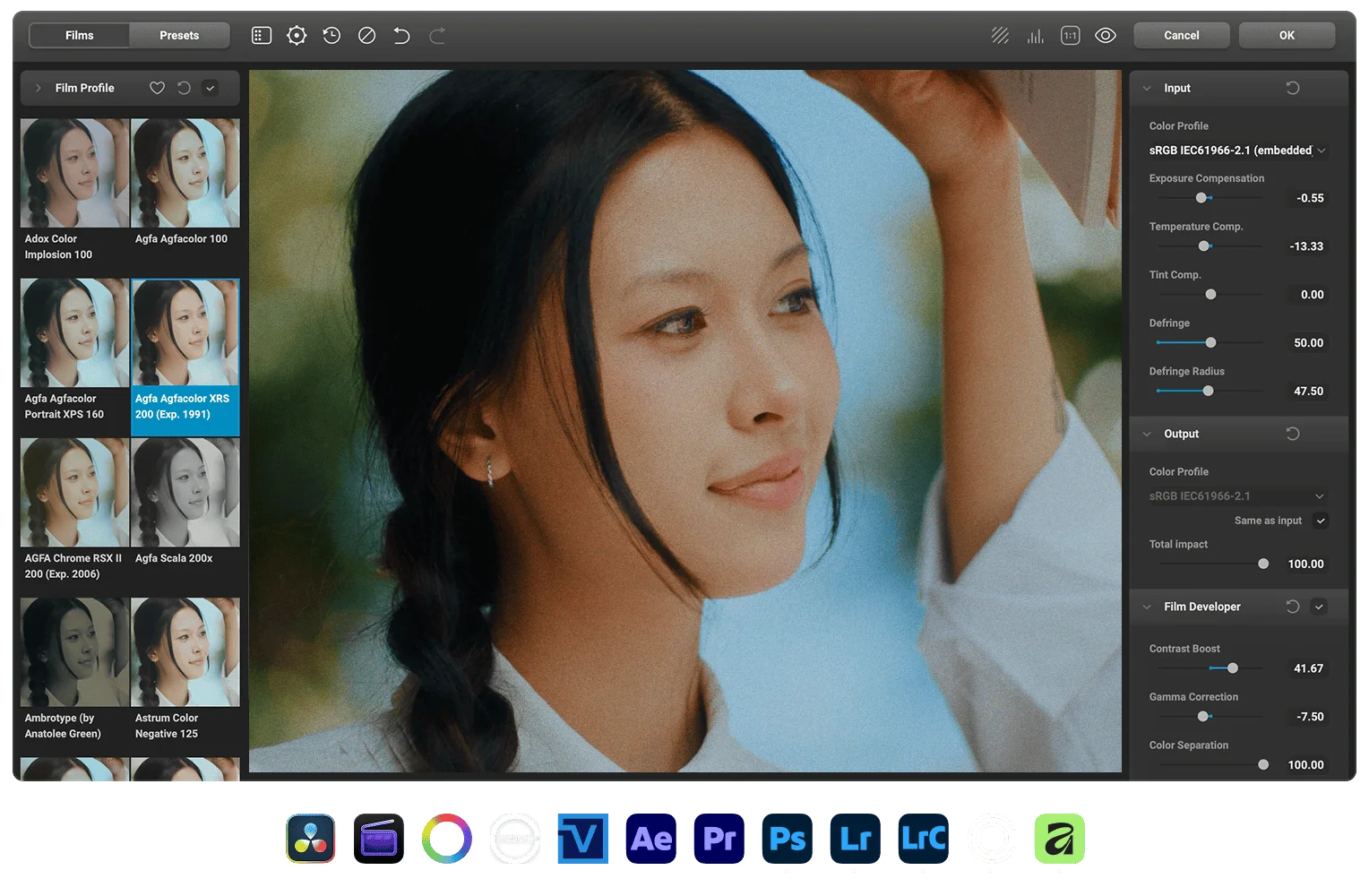
If you use Fylm.ai primarily to achieve realistic analogue film tones, Dehancer Photo is the strongest direct desktop alternative. Rather than operating in a separate browser window, Dehancer runs natively as a plugin inside Adobe Photoshop, Adobe Lightroom Classic, Capture One (via external editor workflow), and Affinity Photo.
Dehancer's core strength is its optical physics engine. It models film as a multi-stage analogue process rather than applying simple 1D or 3D color curves. It includes over 60 carefully measured film stock profiles (Kodak Portra, Ektar, Tri-X, Fujifilm Velvia, Provia, Ilford HP5, CineStill 800T), authentic optical film grain sampled from physical emulsions, halation (the reddish glow that appears around high-contrast edges on motion picture film), bloom (diffuse highlight glow), and print paper profiles (such as Kodak Endura and 2383).
- OS Support & GPU: macOS 12+ (macOS 15 Sequoia recommended, Metal GPU required) and Windows 10/11 64-bit (Nvidia or AMD OpenCL GPU required).
- Workflow: Dehancer operates on rasterized data or high-bitdepth TIFFs sent from Lightroom or Capture One. It supports batch editing using its "Last Edits" memory and Photoshop Batch Actions.
- Pricing: The official Dehancer Photo Plan is priced at $156 billed annually (equivalent to $13/month), or $35/month when paying monthly (includes 3 seats, 1 seat per app/host across desktop, iOS, and online). Photographers seeking permanent ownership can purchase an Individual Lifetime License for $549 (includes 2 seats, 1 seat per host). A watermarked demo is available from Dehancer's download center.
Colourlab Ai 4 (AI grading for hybrid shooter timelines)
Colourlab Ai 4 is an advanced AI-powered grading application designed to automate color matching and look creation. Unlike Fylm.ai's browser model, Colourlab Ai 4 is a dedicated desktop application engineered specifically for video timelines and hybrid creators.
It is critical to note Colourlab Ai 4's exact architecture: it is not a photo-editor plugin for Lightroom or Photoshop. Instead, it connects to professional video editing suites:
- DaVinci Resolve Studio: Direct two-way Fetch and Push API connection.
- DaVinci Resolve Free: OpenTimelineIO (OTIO) file roundtripping.
- Adobe Premiere Pro: OTIO timeline roundtripping (a direct link integration is currently planned).
- Apple Final Cut Pro: XML roundtripping (direct link integration planned).
- Hardware & OS: Strictly requires Apple silicon (M1, M2, M3, or M4 chips) and macOS 14 (Sonoma) or newer. Intel Macs and Windows PCs are not supported.
- Still photography: Native RAW still photo support is currently listed by Colourlab as forthcoming. Photographers who shoot hybrid video projects will benefit most, while stills-only photographers will find it overpowered and cumbersome for catalog workflows.
- Pricing: $49/month, $399/year annual subscription, or $799 perpetual lifetime license, backed by a 14-day free trial.
3D LUT Creator (Precision grid color grading and 3D LUT export)
If your goal with Fylm.ai is creating custom 3D LUTs with surgical color accuracy, 3D LUT Creator is a dedicated standalone color-manipulation application developed by Oleg Sharonov for macOS and Windows, featuring a direct two-way bridge to Adobe Photoshop.
Unlike traditional grading wheels that adjust broad tonal ranges, 3D LUT Creator uses a 2D A/B color grid and C/L contrast grid. You can select any precise hue and saturation point (for instance, shifting skin tones away from magenta or twisting green foliage into warm amber) and drag the grid vertex directly without shifting neighboring colors or introducing digital banding.
- Native export formats: Saves looks directly as industry-standard 3D LUT files in .cube, .3dl, and .csv formats.
- Lightroom and Capture One workflow: 3D LUT Creator does not natively export Camera Raw .xmp profiles or Capture One .icc camera profiles directly in-app. Instead, photographers apply LUTs via Adobe Photoshop adjustment layers or convert them to enhanced profiles using external conversion utilities.
- Photoshop integration: Send images and LUTs back and forth between Photoshop and 3D LUT Creator with a single click.
- Perpetual pricing tiers: Sold under a lifetime license with free updates through all version 1.xx releases: Grading Edition ($99, includes A/B color grid, Curves, Photoshop two-way integration, Color Match reference transfer, and 33×33×33 maximum LUT export; other tabs excluded); Standard Edition ($199, adds C/L contrast grid, Channels, Volume, 2D Curves, and Masks, with 33×33×33 maximum LUT export; Color Match tool is disabled in Standard); Professional Edition ($249, unlocks 96×96×96 maximum LUT export, restores Color Match, and adds color target matching, Log/RAW support, waveform analyzer, and batch processing).
Pixieset Photo Editor (Formerly Polarr Next: AI batch editing)
For photographers who previously looked to Polarr for batch reference matching, it is important to understand the product evolution. Polarr's professional AI batch editing tool (formerly known as Polarr Next) transitioned into Pixieset Photo Editor.
Pixieset Photo Editor is a dedicated desktop and browser-based platform designed specifically for high-volume portrait and wedding photographers. It uses artificial intelligence to analyze reference styles and apply consistent exposure, white balance, and tone adjustments across entire RAW catalogs.
- Pricing: Free tier ($0) for evaluation; paid plan at $12/month billed annually ($144/year) or $18/month on monthly billing, unlocking full AI editing, custom AI styles, RAW photo support, and unlimited exports.
- Consumer app distinction: The standalone Polarr app remains available on iOS, Android, macOS, and Windows as a consumer image editor with creative filters and selective masking ($3.99/month or $19.99/year), but is not designed for catalog-scale professional RAW batch grading.
Media.io (Free online auto-color correction)
Media.io Auto Color Correct is a lightweight, web-based utility for photographers and casual content creators who just need a quick, automated image fix.
Unlike Fylm.ai, Media.io is not a creative color grading or LUT creation suite. It uses automated algorithms to balance underexposed shadows, remove color casts, and correct white balance in a single click. It is completely browser-based, requires no installation, and is free for occasional use, though it lacks RAW file support and professional profile exports.
Discontinued: Color.io (Shut down December 2025)
Color.io was previously the most direct web-based alternative to Fylm.ai, offering film emulation and LUT creation in a browser.
Important status update: As reported by CineD, Color.io's founder officially announced that the online platform shut down on 31 December 2025. While existing Pro subscribers received access to an offline legacy desktop build, the cloud platform is offline and closed to new registrations. We no longer recommend Color.io as an active alternative for photographers.
Lightroom Classic and Capture One Pro (The tools you already own)
Before investing in a third-party color grading suite, it is worth evaluating the tools already inside your primary RAW converter:
- Adobe Lightroom Classic: Features 3-Way Color Grading wheels (Shadows, Midtones, Highlights, and Global), Point Color for surgical hue-saturation-luminance sampling, the Calibration panel (a favorite among portrait photographers for rich skin tones), and tone curves.
- Capture One Pro: Includes an industry-standard Advanced Color Editor with dedicated Skin Tone uniformity sliders, 3-Way Color Balance wheels, and per-layer opacity grading.
If your objective is simply clean, consistent, flattering color across weddings or portraits, mastering your RAW editor's built-in toolset often eliminates the need for external grading software.
An honest word on fit
Most dedicated grading suites—Fylm.ai included—originate from the film and motion picture industry. They are invaluable for photographers who want film-stock physics, custom LUT creation, and profiles they can share across video and still projects.
However, workflow friction is real. Cloud roundtripping requires uploading heavy files, while standalone grading apps require exporting TIFF intermediates. Align your choice with your actual bottleneck:
- For authentic film grain, halation, and stock profiles in your editor: Choose Dehancer Photo.
- For precision color grid control and perpetual-license 3D LUT export: Choose 3D LUT Creator.
- For AI shot-matching across video timelines on Apple silicon: Choose Colourlab Ai 4.
- For AI batch styling across catalog shoots: Choose Pixieset Photo Editor.
- For general catalog color consistency: Stick with your existing RAW editor.
So, which alternative?
- Want film emulation, grain, and halation inside Lightroom or Photoshop? Dehancer Photo ($156/yr billed annually, equivalent to $13/mo; $35/mo monthly; or $549 lifetime).
- Want surgical color control and universal 3D LUT creation without a subscription? 3D LUT Creator ($99–$249 perpetual license).
- Want AI timeline shot-matching for video projects on macOS? Colourlab Ai 4 ($49/mo, $399/yr, or $799 perpetual; Apple silicon required).
- Looking for AI catalog editing and custom styles (formerly Polarr Next)? Pixieset Photo Editor (Free tier; $12/mo billed annually or $18/mo monthly).
- Looking for a free, occasional auto-balance fix? Media.io (free browser utility).
- Looking for Color.io? Remember that Color.io shut down its online service in December 2025 and is no longer available for new users.
- Already paying for Lightroom or Capture One? Master their built-in Color Grading wheels and Color Editor tools before spending on external software.